Tests check if your new, shiny function is correct
Tests check if your refactorings won't break anything
Tests help you write good code, because bad code is hard to test
Tests form an executable documentation
def get_max(values):
    """
    A simple function to get maximum value from a list of values
    """

    max_value = values[0]

    for value in values[1:]:
        if value > max_value:
            max_value = value

    return max_value
# Execute with py.test or similar
def test_get_max():

    values = [2, 5, 10, 1]

    expected = 10
    actual = get_max(values)

    assert expected == actual
Harder example
# Are you sure you can write this function without any bugs?
def get_polygon_area(polygon):

    # Loads of math
    # ...
    return area
With unit tests you will know if your code is right or wrong!
If you don't know your code is correct, how can you tell you're done? If you don't know when you're done, how can you measure if tests slow you down?
Is it better to write correct function in 30min, or wrong one in 10min and next week have entire team blocked for 4h while you try to figure out what needs fixing and how to fix it?
Do you prefer to find your bugs yourself, or would you rather have an angry customer bring them up to your boss?
Testing makes your code better
Say you have to write functionality that counts number of words in some text files, and you come up following code:
def get_words_count(path):

    with open(path) as file:

        text = file.read()

        matches = re.findall(pattern=r"\w+", string=text)
        return len(matches)
This code looks ok on cursory inspection, but what would happen if you were to test it?
You would have to do something like this:
def test_get_words_count_simple_input():

    with tempfile.NamedTemporaryFile(mode="w") as file:

        file.write("some simple text")
        file.flush()

        expected = 3
        actual = get_words_count(file.name)

    assert expected == actual


def test_get_words_count_input_contains_special_characters():

    with tempfile.NamedTemporaryFile(mode="w") as file:

        file.write("Some !!! special ??? characters --- here")
        file.flush()

        expected = 4
        actual = get_words_count(file.name)

    assert expected == actual
But why is that necessary? After all counting words shouldn't require you to create a file, right?
Creating a file has nothing to do with functionality you want to test, so why is it necessary to perform testing?
If testing the functionality is not convenient, then that functionality likely isn't written in a flexible way and won't be easy to use under different circumstances.
Say what would happen if I wanted to count number of words on a webpage available online? I would have to download to local drive first, and then take care of deleting it.
All of this suggests that there are some problems with our function. Now let's think what would be easy to test?
How about
def get_total_weight(products):

    total_weight = 0

    for product in products:

        if product.weight is not None:
            total_weight += product.weight

    return total_weight
Now results are as expected.
Ok, but what about commands that require asking questions? E.g. what if I want to delete files older than some date?
# Command can make queries - no problem
def delete_files_older_than(directory, date):

    # Query
    old_files = get_files_older_than(directory, date)

    # Command
    delete_files(old_files)
So calling a query from inside a command is fine.
What if I want to call a command from inside a query? That would mean query changes the system - so it's not a query ^^
Ok, but what if I want to delete old files and return back how many files are left? It's best to split this logic into two functions
class BooksShoppingWidget:

    def __init__(books):

        # Display top navigation widget
        ...

        # Build query widget, 20 lines of code
        ...

        # Build books list
        for book in books:

            # Display book cover
            ...

            # Display title
            ...

            # Get first 100 characters of book description
            description = []

            with open(book.url) as book_data:
                while len(description) < 100:

                    line = book_data.read_line()
                    description.extend(line)

            # Display description
            ... = description[:100]


        # build recommendations widget, 20 lines of code
        ...


class RandomBookDescriptionWidget:

    def __init__(books):

        index = get_random_integer(0, len(books))
        book = books[index]

        # Get first 100 characters of book description
        description = []

        with open(book.url) as book_data:
            while len(description) < 100:

                line = book_data.read_line()
                description.extend(line)

        # Display description
        ... = description[:100]
vs
def get_book_description(book):

    # Get first 100 characters of book description
    description = []

    with open(book.url) as book_data:
        while len(description) < 100:

            line = book_data.read_line()
            description.extend(line)

    return description[:100]


class BooksShoppingWidget:

    def __init__(books):

        # Display top navigation widget
        ...

        # Build query widget, 20 lines of code
        ...

        # Build books list
        for book in books:

            # Display book cover
            ...

            # Display title
            ...

            # Display description
            ... = get_book_description(book)

        # build recommendations widget, 20 lines of code
        ...


class RandomBookDescriptionWidget:

    def __init__(books):

        index = get_random_integer(0, len(books))
        book = books[index]

        # Display description
        ... = get_book_description(book)
Don’t repeat yourself (DRY) II - nearly identical code
class BooksShoppingWidget:

    def __init__(books):

        # Display top navigation widget
        ...

        # Build query widget, 20 lines of code
        ...

        # Build books list
        for book in books:

            # Display title
            ...

            # Display book cover
            ...

            # Get first 100 characters of book description
            description = []

            with open(book.url) as book_data:

                while len(description) < 100:

                    line = book_data.read_line()
                    description.extend(line)

        # Display description
            ... = description[:100]


        # build recommendations widget, 20 lines of code
        ...


class RandomBookDescriptionWidget:

    def __init__(books):

        index = get_random_integer(0, len(books))
        book = books[index]

        # Get first 200 characters of book description
        description = []

        with open(book.url) as book_data:
            while len(description) < 200:

                line = book_data.read_line()
                description.extend(line)

        # Display description
        ... = description[:200]
vs
def get_book_description(book, characters_count):

    description = []

    with open(book.url) as book_data:
        while len(description) < characters_count:

            line = book_data.read_line()
            description.extend(line)

    return description[:characters_count]


class BooksShoppingWidget:

    def __init__(books):

        # Display top navigation widget
        ...

        # Build query widget, 20 lines of code
        ...

        # Build books list
        for book in books:

            # Display title
            ...

            # Display book cover
            ...

            # Display description
            ... = get_book_description(book, 100)


        # build recommendations widget, 20 lines of code
        ...


class RandomBookDescriptionWidget:

    def __init__(books):

        index = get_random_integer(0, len(books))
        book = books[index]

        # Display description
        ... = get_book_description(book, 200)
Explicit is always better than implicit I - using globals
Say you see code like this:
# script.py
text = "I like cats. I like dogs. Dogs don't like cats. I wish they would like each other."

frequent_words = get_frequent_words(text)
print(frequent_words) # prints ['I', 'like']
But how does this code decide which words are frequent? We have to look inside the function to find out:
import config

def get_frequent_words(text):

    words = re.findall(r"\w+", text)
    words_counter = collections.Counter(words)

    frequent_words = [word for word, count in words_counter.items()
                      if config.frequent_words_threshold <= count]

    return frequent_words
You have to read content of get_frequent_words(...) and of config module to understand what’s going on.
That's an implicit code - it hides some of its inputs from the reader, so it is difficult to understand how it works.
Solution:
change globals into function arguments
move configuration values into script entry point
# script.py
import config

text = "I like cats. I like dogs. Dogs don't like cats. I wish they would like each other."

frequent_words = get_frequent_words(text, config.frequent_words_threshold)
print(frequent_words) # prints ['I', 'like']
Explicit is always better than implicit II - assuming your clients
def get_house_value(house_data):

    if house_data.last_evaluation_date == time.today:
        return -1

    # Look at size, number of rooms, neighbourhood
    # and other factors, expensive computation
    value = ...

    return value
Why -1 is returned when last_evaluation_date == time.today?
class PropertiesManager:

    # Other code
    # ...

    def get_house_data(id):

        house_data = database.get_house_data(id)
        value = get_house_value(house_data)

        if value == -1:
           value = self.cached_houses_values[id]

        house_data.value = value
        return house_data
Ok, and what would happen if someone who doesn’t know that -1 means cached results should be used calls the function?
Solution: move cache condition check to PropertiesManager
def get_house_value(house_data):

    # Look at size, number of rooms, neighbourhood
    # and other factors, expensive computation
    value = ...
    return value


class PropertiesManager:

    # Other code
    # ...

    def get_house_data(id):

        house_data = database.get_house_data(id)

        if house_data.last_evaluation_date != time.today:
            self.cached_houses_values[id] = get_house_value(house_data)

        house_data.value = self.cached_houses_values[id]
        return house_data
Error codes vs exceptions
Task: print a document
# Using error codes
def print(document, print_settings):

    # Connect to printer
    printer_connection, error = get_printer_connection()

    if error != 0:
        return error

    # Get documents data stream
    document_data_stream, error = document.get_data_stream()

    if error != 0:
        return error

    error = printer_connection.print(document_data_stream, print_settings)

    # 0 if succeeded, else non-zero
    return error


# In client:
error = print(document, print_settings)

if error != 0:
    # Do something
vs
# With exceptions:
def print(document, print_settings):

    # Connect to printer
    printer_connection = get_printer_connection()

    # Get documents data stream
    document_data_stream = document.get_data_stream()

    # Print
    printer_connection.print(document_data_stream, print_settings)


# In client
try:
    print(document, print_settings)
except:
    # Do something
Splitting complex classes into components
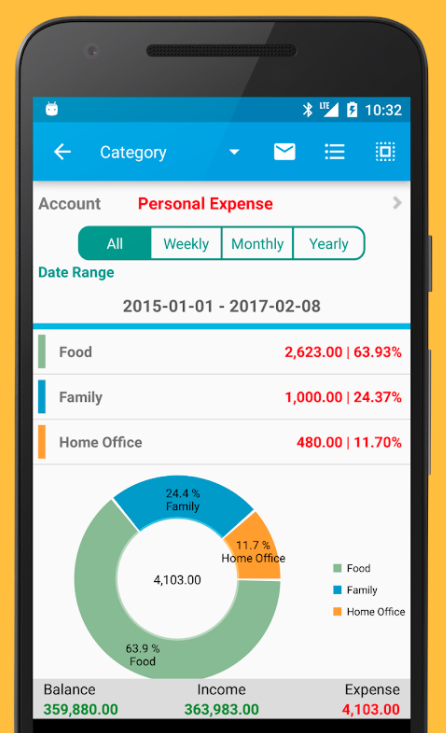
Suppose you have to write an app with a reasonably complex GUI
Expense Manager app by Bishinews Here's a naive way to go about it
class App:

    def __init__(self):

        # Create buttons for selecting time ranges used by expenses graphics
        time_ranges_buttons_container = Container(...)

        self.all_button = Button("All", ...)
        time_ranges_buttons_container.add(time_ranges_buttons_container)

        self.weekly_button = Button("Weekly", ...)
        time_ranges_buttons_container.add(time_ranges_buttons_container)

        self.monthly_button = Button("Monthly", ...)
        time_ranges_buttons_container.add(time_ranges_buttons_container)

        self.yearly_button = Button("Yearly", ...)
        time_ranges_buttons_container.add(time_ranges_buttons_container)

        # 20 lines of UI code around buttons

        self.layout.append(time_ranges_buttons_container)

        # 500 more lines of code building other widgets
Every single button, label and other simple widget on the screen is defined inside App class. This makes App class very large and complex - hence hard to work with and easy to break.
Instead of writing everything inside App class, search for components that could encapsulate simple elements.
class App:

    def __init__(self):

        self.time_ranges_container = TimeRangesContainer(...)
        self.layout.append(self.time_ranges_container)

        # Access buttons with self.time_ranges_container.weekly_button, etc

        # 50 lines or less of code building other widgets, since we encapsulated them in components as well


class TimeRangesContainer(Container):

    def __init__(...):

        self.all_button = Button("All", ...)
        self.add(self.all_button)

        self.weekly_button = Button("Weekly", ...)
        self.add(self.weekly_button)

        self.monthly_button = Button("Monthly", ...)
        self.add(self.monthly_button)

        self.yearly_button = Button("Yearly", ...)
        self.add(self.yearly_button)

        # 20 lines of UI code around buttons
Anonymous functions and their drawbacks
Without anonymous function:
function on_button_clicked() {
    // Do something
}

$(".btn_1").click(on_button_clicked);
With anonymous function:
$(".btn_1").click(function() {
  // Do something
});
The problem is you can't test that. So how do you know if code below is correct?
$(".phone_number").focusout(function() {
  // get text
  var phone_number = $(".phone_number").val() ;

  // format it in xxx-yyyy-zzz form
  // ...

  // write it back to phone_number_form
  $(".phone_number").val(formatted_phone_number) ;
});
If instead you write
function get_formatted_phone_number(phone_number) {

    // format it in xxx-yyyy-zzz form
    // ....
    return formatted_phone_number ;
}


$(".phone_number").focusout(function() {

    var phone_number = $(".phone_number").val() ;
    var formatted_phone_number = get_formatted_phone_number(phone_number) ;
    $(".phone_number").val(formatted_phone_number) ;
});
you can test that your logic is correct
test('phone number is correctly formatted', () => {

    expected = "123-456-789"
    actual = get_formatted_phone_number("123456789")

    expect(actual).toBe(expected)
});
Use sets for filtering unique elements
import time
import numpy as np


def get_unique_elements(data):

    unique_elements = []

    for element in data:

        element_already_added = False

        for unique_element in unique_elements:

            if element == unique_element:
                element_already_added = True
                # Ugly
                break

        if not element_already_added:
            unique_elements.append(element)

    return unique_elements


def main():

    data = np.random.randint(0, 100, 1000000)

    start = time.time()
    first_unique_elements = get_unique_elements(data)
    print("get_unique_elements(...) computation time: {:.5f} sec".format(time.time() - start))

    start = time.time()
    second_unique_elements = set(data)
    print("set(...) computation time: {:.5f} sec".format(time.time() - start))

    print("Are both unique elements arrays the same: {}".format(
        sorted(first_unique_elements) == sorted(second_unique_elements)))


if __name__ == "__main__":
    main()
python ./main.py
get_unique_elements(...) computation time: 1.90668 sec
set(...) computation time: 0.07359 sec
Are both unique elements the same: True
Safe interface changes with branching
Problem: Find best pokemon to start you battle!
class Trainer:

    # Loads of other code
    ...

    def get_starting_pokemon(self, opponents_pokemons):

        scores = []

        for current_pokemon in self.my_pokemons:

            current_pokemon_score = 0

            for opponent_pokemon in opponents_pokemons:

                is_current_pokemon_expected_winner = \
                    get_expected_winner(current_pokemon, opponent_pokemon) == current_pokemon

                current_pokemon_score += int(is_current_pokemon_expected_winner)

            scores.append(current_pokemon_score)

        return self.my_pokemons(np.argmax(scores))
def get_expected_winner(first_pokemon, second_pokemon):

    # Compare levels, stats, and types to decide
    return ...
Ok, this worked in Pokemon Red/Green/Yellow, but we entered 21st Century, we have Pokemon Sun/Moon (and more) and now battlefield type influences Pokemons' stats as well!
We need to change get_expected_winner(current_pokemon, opponent_pokemon) to:
def get_expected_winner(first_pokemon, second_pokemon, battlefield_type):

    # Compare levels, strength, types and battlefield bonuses to decide
    return ...
But if we try to change get_expected_winner(...) now, we will break the client (Trainer class) and it will stay broken until we finish writing get_expected_winner(...). What if this will take us more than a few hours? Whole codebase will be broken during that time and we won't be able run our software.
Instead use a branching method:
1. Create a copy of get_expected_winner(first_pokemon, second_pokemon) called get_expected_winner_new(first_pokemon, second_pokemon)
def get_expected_winner(first_pokemon, second_pokemon):

    # Compare levels, stats, and types to decide
    return ...

def get_expected_winner_new(first_pokemon, second_pokemon):

    # Compare levels, stats, and types to decide
    return ...
2. Add new argument: get_expected_winner_new(first_pokemon, second_pokemon, battlefield_type)
def get_expected_winner(first_pokemon, second_pokemon):

    # Compare levels, stats, and types to decide
    return ...

def get_expected_winner_new(first_pokemon, second_pokemon, battlefield_type):

    # Compare levels, stats, types and battlefield type influence to decide
    return ...
3. Work on get_expected_winner_new(first_pokemon, second_pokemon, battlefield_type) until it's completed
4. Change Trainer class to use get_expected_winner_new(first_pokemon, second_pokemon, battlefield_type) and make sure it works as expected
class Trainer:

    # Loads of other code
    ...

    def get_starting_pokemon(self, opponents_pokemons):

        scores = []

        for current_pokemon in self.my_pokemons:

            current_pokemon_score = 0

            for opponent_pokemon in opponents_pokemons:

                # is_current_pokemon_expected_winner = \
                #    get_expected_winner(current_pokemon, opponent_pokemon) == current_pokemon

                is_current_pokemon_expected_winner = \
                    get_expected_winner_new(current_pokemon, opponent_pokemon, battlefield_type) == current_pokemon

                current_pokemon_score += int(is_current_pokemon_expected_winner)

            scores.append(current_pokemon_score)

        return self.my_pokemons(np.argmax(scores))
5. Remove get_expected_winner(first_pokemon, second_pokemon) and make sure everything works (maybe it had more clients you forgot about?)
# def get_expected_winner(first_pokemon, second_pokemon):

#     # Compare levels, stats, and types to decide
#     return ...

def get_expected_winner_new(first_pokemon, second_pokemon, battlefield_type):

    # Compare levels, stats, types and battlefield type influence to decide
    return ...
6. Rename get_expected_winner_new(first_pokemon, second_pokemon, battlefield_type) to get_expected_winner(first_pokemon, second_pokemon, battlefield_type)
def get_expected_winner(first_pokemon, second_pokemon, battlefield_type):

    # Compare levels, stats, types and battlefield type influence to decide
    return ...
Using branching, you will arrive where you wanted to be, without ever breaking the client and always being able to run your software.
Write code for reader who doesn't know anything about your project
Recommended reading
"Code Complete" by Steve McConnell (日本語版あり)
"The Algorithm Design Manual" by Steven S. Skiena (日本語版あり)
"Design patterns: Elements of reusable object-oriented software" by Erich Gamma, Richard Helm, Ralph Johnson and John Vlissides (Gang of Four)